IMPORTANT! This process will invalidate your existing GEN-I License Key(Dongle) and is irreversible, therefore DO NOT proceed unless you wish to permanently migrate to the new GEN-II licensing model.
To migrate to the new Gen-II License follow the steps below.
- Ensure the computer has a valid Internet connection.
- If the target installation was initially installed from Compact Disc (CD), the needed GEN-II License Management Tool may not already be installed. In this case, depending on the CompuHost major version (V1, V2 or V3), download and reinstall CompuHost utilizing the applicable HYBRID installer below (the GEN-II License Management Tool will be installed as part of the reinstallation) ...
- Ensure your GEN-I USB License Key (Dongle) is plugged in and properly initialized before proceeding.
- Launch the GEN-II Software License Management Tool found in the CompuHost Program Group (Start->All Programs->CompuHost...)
HINT: In your Windows Search Box simply type in the letters “GEN” (without the quotations) and select the GEN-II License Management Tool from the search results above”
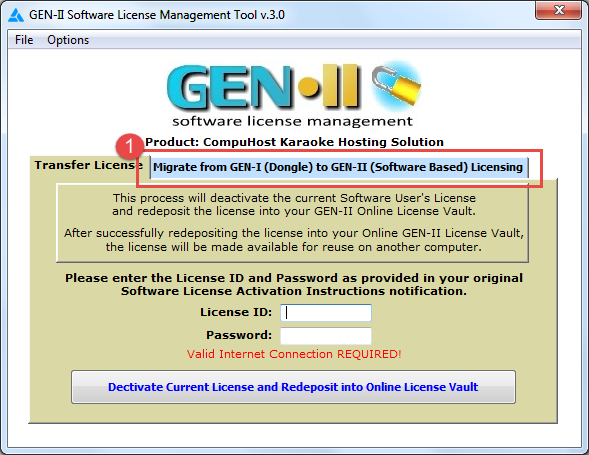
- During startup, the GEN-II License Management Tool will check for a valid GEN-I License Key (Dongle) and if found, a second tab will be provided labeled "Migrate from GEN-I (Dongle) to GEN-II (Software Based) Licensing". (See image below)
What if the second tab is missing?
- Ensure you have installed CompuHost utilizing the HYBRID installer as required. (See download links above)
- Ensure the GEN-I License Key is properly plugged into an available USB port and initialized.
- Select the second tab entitled "Migrate from GEN-I (Dongle) to GEN-II (Software Based) Licensing"
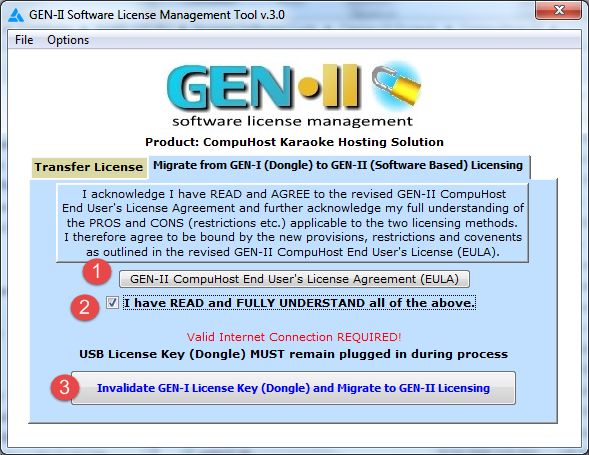
- Be sure to READ, FULLY UNDERSTAND, and AGREE to the new "GEN-II CompuHost End User's License Agreement (EULA)" (1) and if so click the confirmation checkbox (2).
- Click the "Invalidate GEN-I License Key (Dongle) and Migrate to GEN-II Licensing" button. (3)
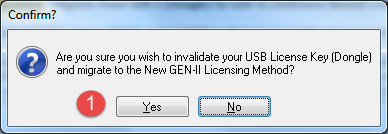
- Once again, please be reminded that the migration process is totally irreversable! Click "Yes" (1) to proceed...
As part of the migration process, your existing GEN-I License Key will be invalidated and a new GEN-II license activated on your computer, allowing for future use without the need for the dongle.
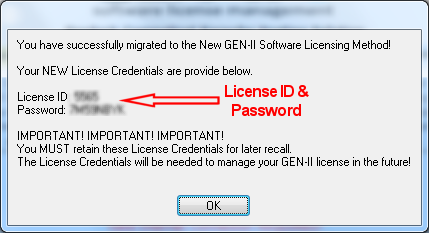
IMPORTANT! Your assigned GEN-II License ID and Password will be provided to you. (See image below). These credentials will be required for future license management (activations, deactivation etc.) and therefore should be documented and securely stored for later recall.